Device cards
A card that matches the device
Sliders for dimmers, a colour wheel for colour bulbs, a setpoint for thermostats, live watts for metering plugs — each tile is built for its job.
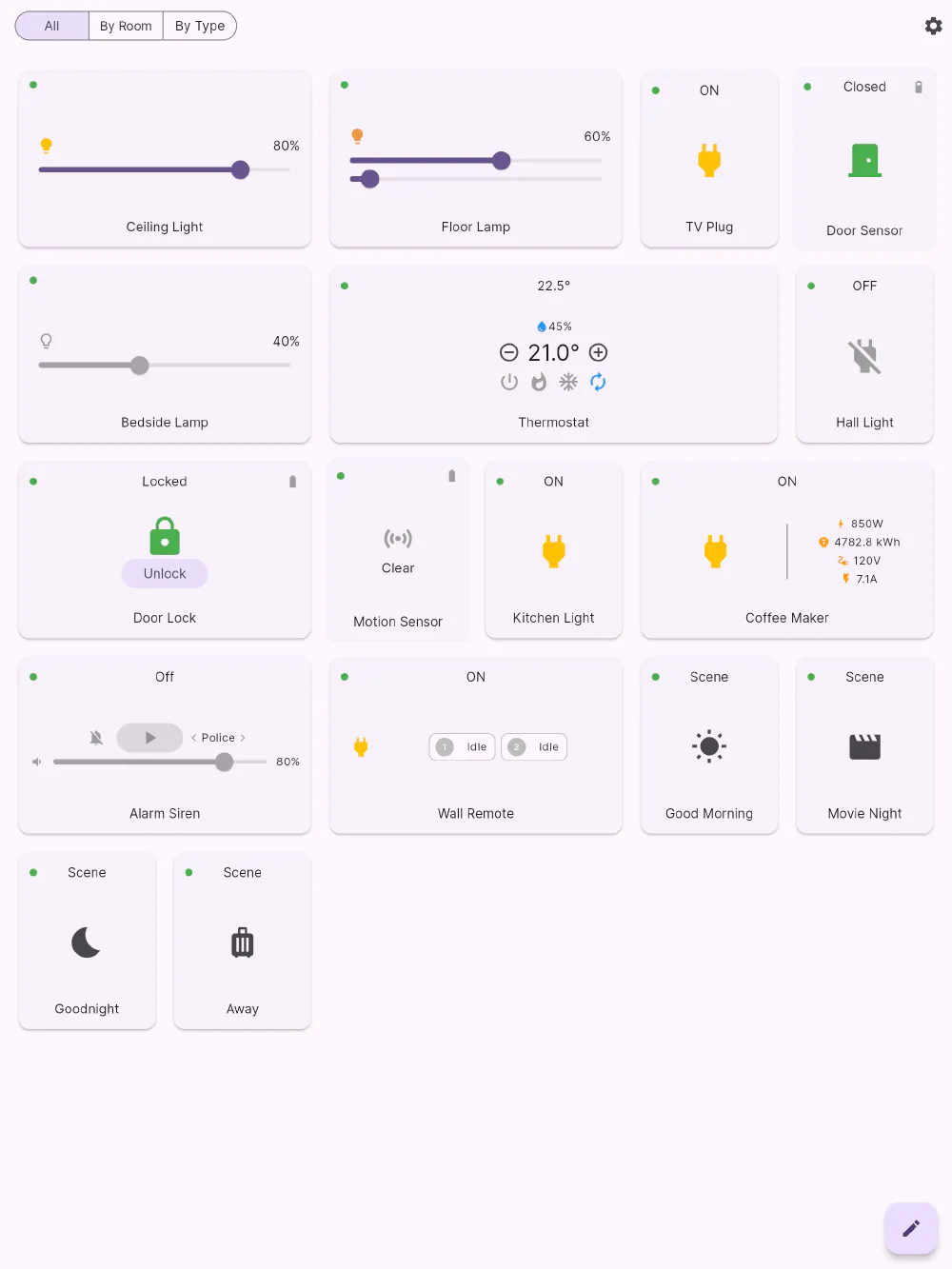
Flick models a device as a class plus a set of capabilities, and the card you see is assembled from those capabilities. That is why a metering plug shows watts while an ordinary plug doesn’t, and why a battery-powered sensor shows a battery icon while a mains one doesn’t — without you configuring anything.
What each card gives you
| Device | On its card |
|---|---|
| Switch / plug | On-off control and current state, in plain words. |
| Metering plug | The same, plus live watts, cumulative kWh, volts and amps. |
| Dimmer | A brightness slider you drag, with the level as a percentage. |
| Colour light | Brightness plus colour — hue and saturation, or colour temperature for tunable-white bulbs. |
| Thermostat | Current temperature and humidity, a setpoint with + and −, and mode buttons for off, heat, cool, auto and fan. |
| Air conditioner | Setpoint, mode and fan control for AC units. |
| Smart lock | The lock state and a single explicit Lock / Unlock button — never a toggle you could hit by accident. |
| Motion sensor | Motion or Clear, with battery level. |
| Door / window sensor | Open or Closed, with battery level. |
| Temperature, humidity, light and leak sensors | The reading, in your units. |
| Siren | On-off, tone selection and a volume slider. |
| Scene controller | The remote’s buttons, with what each one last did. |
| House mode | Home, Away, Night and Vacation as one tile. |
| Camera | The latest thumbnail, with arm/disarm and a tap through to live view. |
| Scene | A single big tap target, with an icon you choose. |
Details in the same place every time
Every card shares a small amount of common furniture, so scanning the dashboard works even with a dozen different card types on it: a reachability dot in the top-left corner, the status in words along the top, the device name at the bottom, and secondary readings — battery, humidity — as small icons in the top edge. Learn one card and you have learned all of them.
Sizes that suit the content
Cards declare the width they want. A dimmer or colour light takes a wide tile because a slider needs room to be accurate; a sensor or plug is legible in a compact square. The grid honours those preferences, which is what keeps a mixed dashboard looking deliberate rather than stretched.
Get Flick
Free to download. Bring your own hub — Flick talks to the equipment you already own.