Status and control
Live status that never gets in your way
Changes from anywhere in the house appear as they happen — and a device Flick isn't sure about still lets you press the button.
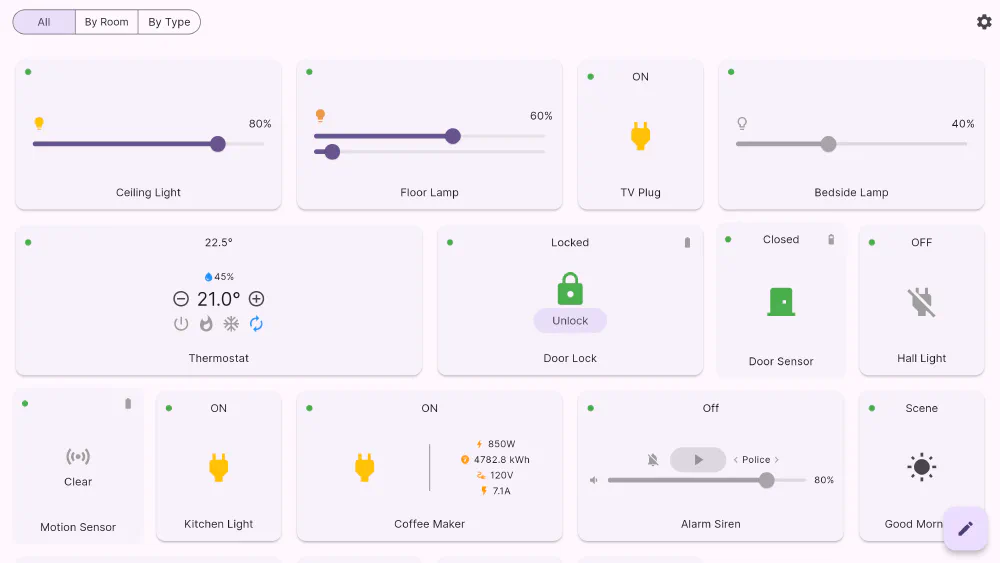
A home automation app that only knows what it did itself is a remote control. Flick is built the other way round: every connection streams updates, and the tiles follow the house.
Updates you didn’t ask for
When someone dims the lamp at the wall switch, when the thermostat crosses its setpoint, when a door opens, the change flows from the hub into the app and only the affected tile redraws. There is no polling loop you have to wait for and no “refresh” you have to remember. If you want to force a re-read — after a hub restart, say — pull down on the dashboard and Flick reloads every connection at once.
Stale status never blocks you
This is a deliberate design rule, and it is unusual. If Flick believes a light is already on, it will still let you turn it on. The reasoning is simple: the app’s picture of your home can be out of date, but your intent isn’t. An app that greys out the button because it thinks the job is done is worse than useless at exactly the moment you need it.
When the state is genuinely unknown
Right after you send a command — or when a hub reports something contradictory — a device can be in a state Flick honestly can’t name. Rather than showing an arbitrary on-or-off toggle, the card switches to an explicit pair of controls: a turn off button and a turn on button, side by side. You choose the outcome you want, instead of guessing which way a toggle will flip.
Devices that go quiet
Each card carries a small reachability dot, and unreachable devices are shown plainly rather than hidden — that is usually the information you were looking for. If you would rather not see them in the grouped views, one switch in settings turns them off. On your custom dashboard, a tile whose device has gone quiet stays in its position with a placeholder, so your layout never reshuffles itself because a sensor’s battery ran down.
Get Flick
Free to download. Bring your own hub — Flick talks to the equipment you already own.