
The application list
Every app with its sync state and health, live over the watch stream, with search and four filters.
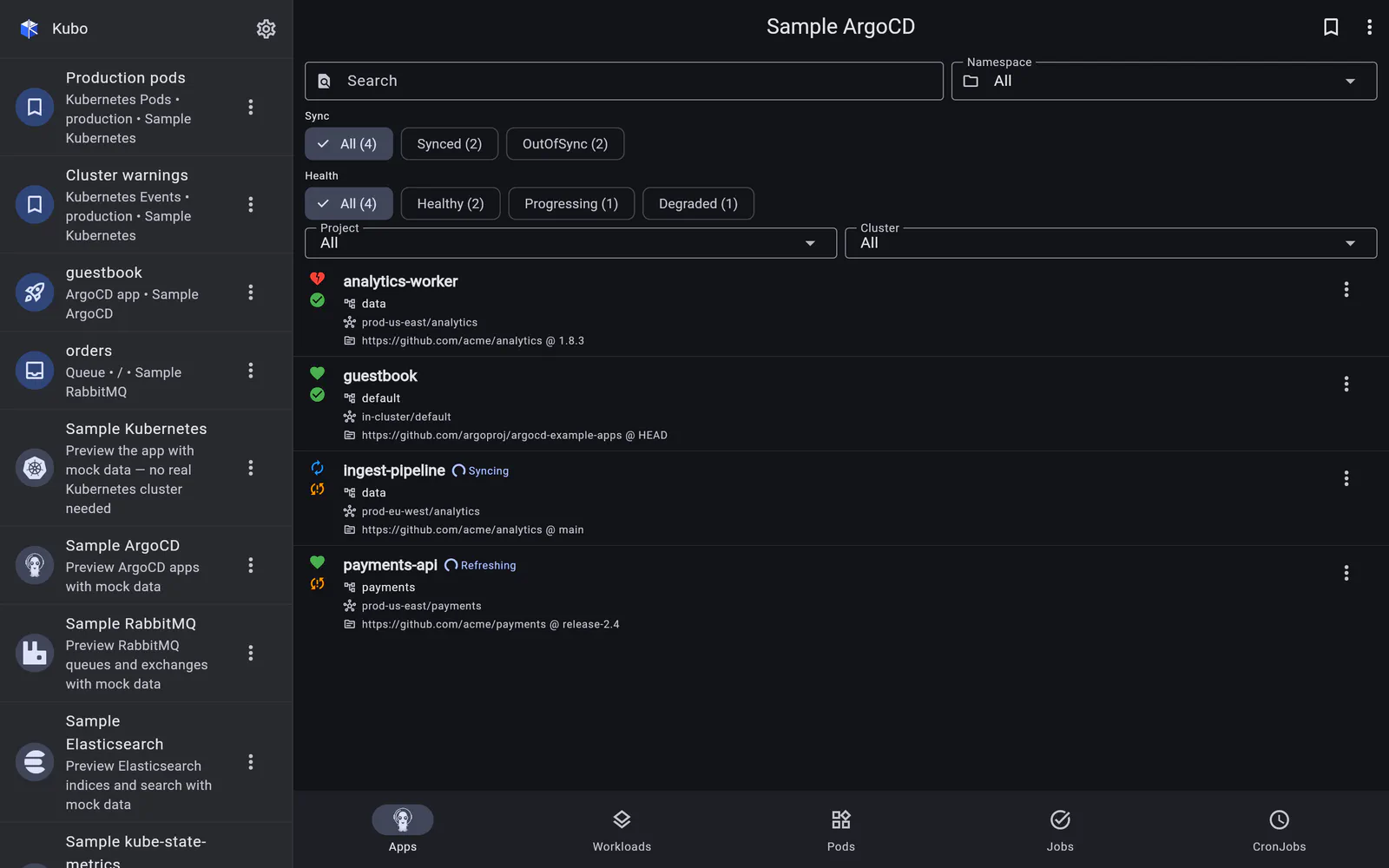
The list is the landing screen of an ArgoCD connection. Each row shows the application’s sync status (Synced / OutOfSync), health (Healthy, Progressing, Degraded, Missing…), its project and destination, and the revision it is on.
Live, not polled
ArgoCD publishes a watch stream for applications, so the list subscribes to it rather than
re-fetching on a timer: a sync you trigger from the row menu updates the row as ArgoCD
progresses through it, and someone else’s argocd app sync shows up the same way. The
stream reconnects on its own if the connection drops.
Finding the app
A free-text search matches the application name, and four filters narrow the list:
- sync status — the fastest way to answer “what is drifting?”;
- health — Degraded first, when something is broken;
- project;
- destination cluster — the reason an ArgoCD connection is top-level in the first place: one instance usually spans several clusters.
These are screen state rather than part of a saved view, so a bookmark of the ArgoCD list restores the screen and its scope, not a filter chip you happened to leave on.
From here
The row menu carries the actions — refresh, sync, restart workloads, rollback — and tapping the row opens the application detail page.
Back to ArgoCD.