
Queues
Depths and rates per queue with a vhost filter and search, a detail page with bindings, and purge or delete behind a confirm.
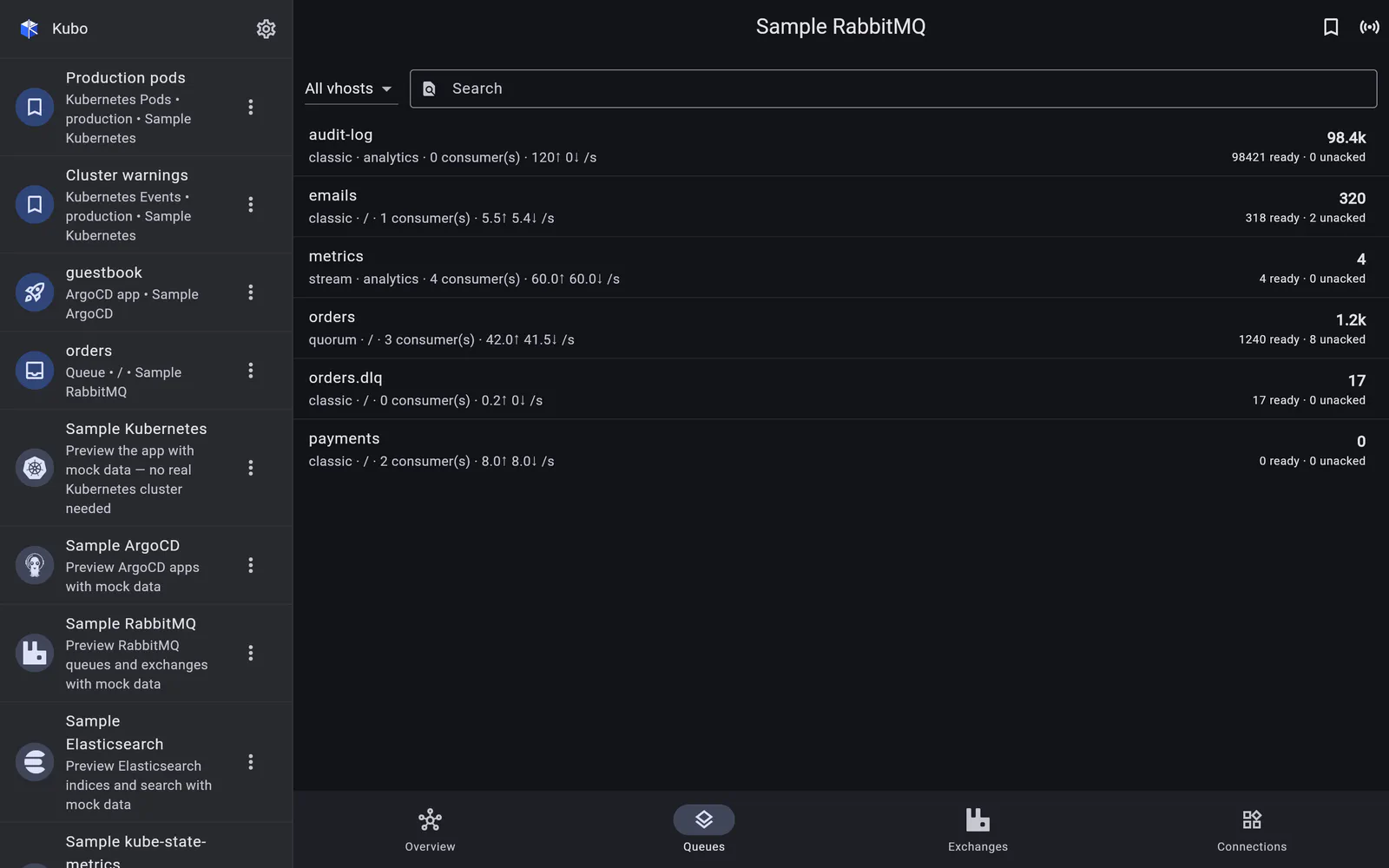
The Queues section lists every queue the broker knows about, filtered by vhost and searchable by name — the two axes that matter when a broker hosts several applications.
Each row shows:
- ready, unacknowledged and total message counts — the depth;
- publish and deliver/ack rates — whether it is draining;
- the queue’s state, durability and node.
Depth without rate is a trap: a queue sitting at 40,000 messages that is draining at 5,000 a second is fine, and one sitting at 200 that is draining at zero is not.
Detail and bindings
Tapping a queue opens its page: a summary header, its own history charts, and its bindings — which exchanges route to it, with which routing keys. That is usually the question behind “why is nothing arriving in this queue”.
Actions
Two, both behind a confirm dialog:
- Purge — drop every message in the queue. Destructive and occasionally exactly what is needed at 3am when a poison message is being redelivered forever.
- Delete — remove the queue.
There is no “publish a test message” and no policy editing. The set is deliberately small: these are the operations you want from a phone, and each of them is one you would want to be asked about twice.
Back to RabbitMQ.